تطبيق المدرّبين
What your instructors see once they accept your invitation — their day, their week, who is booked into each class with any injury to work around, alerts when a class changes, and a record of their teaching and pay at every studio.
Every instructor you add gets their own sign-in to see their day, their classes and who is coming — on the web at instructor.owelz.com and in the Owelz instructor app on iPhone and Android. It is built for the minute before class, not for running the studio: nothing in it changes your schedule, your customers or your money.
Giving an instructor access
- Add them under Staff with their name, email, phone and the classes they teach (Staff and roles). The email is required: it is their Owelz instructor account.
- Owelz emails them an invitation with their username and a link to choose their own password (the link works for 7 days). You never set or see the password. If that email already has an Owelz instructor account — they teach at another studio on Owelz — there is no invitation: your studio is added to their account and they are told it now appears in their app.
- They sign in with their email, username or phone and their password. They can switch the app to Arabic from Me; the app, and the alerts they receive, then follow that language.
Instructors brought across with Import data are not emailed: their row shows Not invited yet. When you are ready, Invite to the app on the Instructors page sends everyone their invitation, a few at a time — or tick the ones to invite, or open one and press Send invitation.
Their row on Staff shows Invited once the invitation has gone, until they set a password, then Active. While they are invited you can correct the email or username and Resend invitation. Once they are active, the email, username and password are theirs: they change them under Me → Account, and your staff form shows them read-only. If they forget the password, Forgot your password? in the app emails them a reset link.
Deactivating the instructor ends their access to your studio. Their account, and any other studio they teach for, are not affected; their past classes and pay stay on your records.
What they see
| Tab | What is on it |
|---|---|
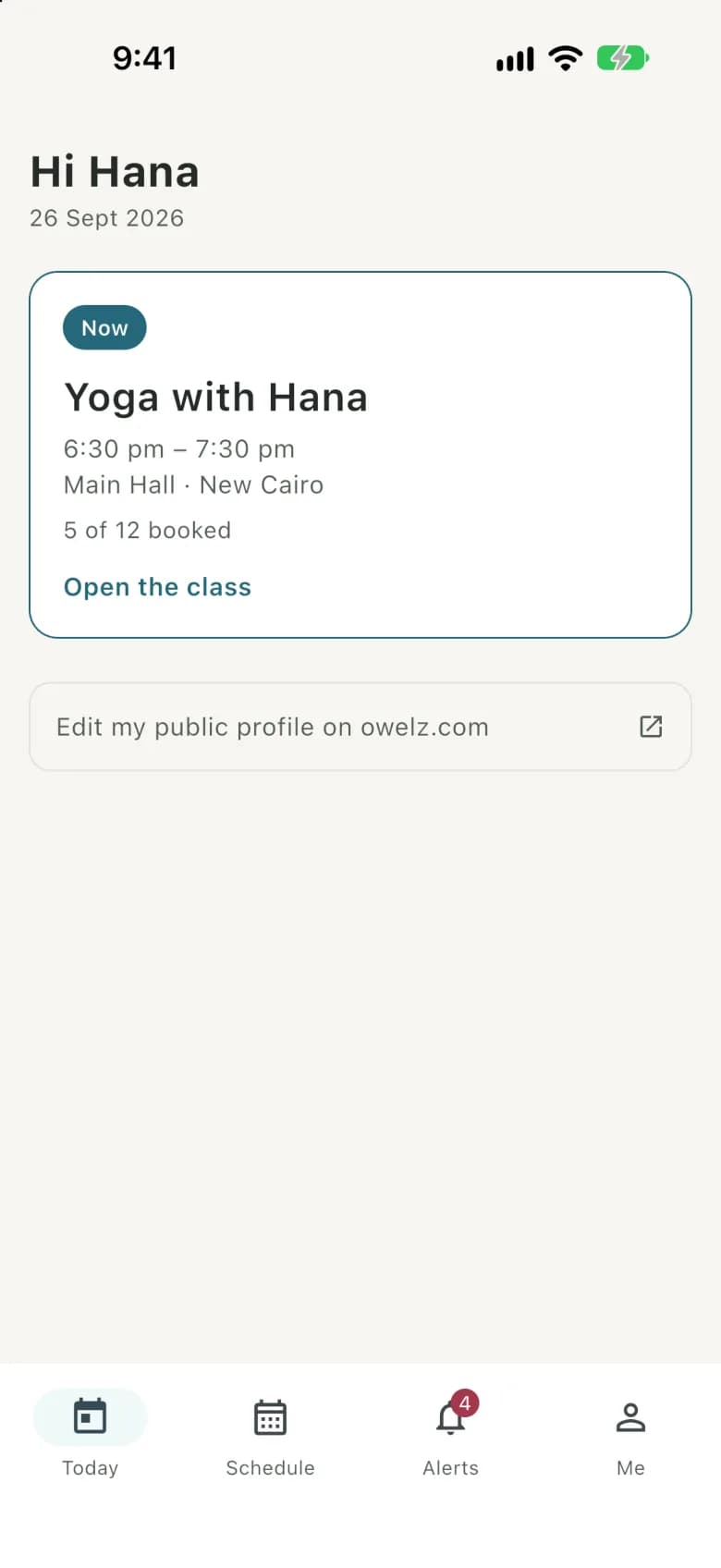
| Today | The next class — or the one in progress, marked Now — with its time, room and branch, how many are booked, and a countdown ("in 2 h 9 min"). Anything else they teach later today sits underneath. Open the class goes to its list. |
| Schedule | Their week, a day at a time, with each class's booked count. Arrows move a week at a time; an empty day says so. |
| Alerts | Every message Owelz sent them, newest first. Tapping one opens the class it is about. |
| Me | Language, alert settings, My record, Account (their email, username, phone and password), the studios they teach for with a switch between them, a link to their public profile on owelz.com, and sign out. |
A class's page
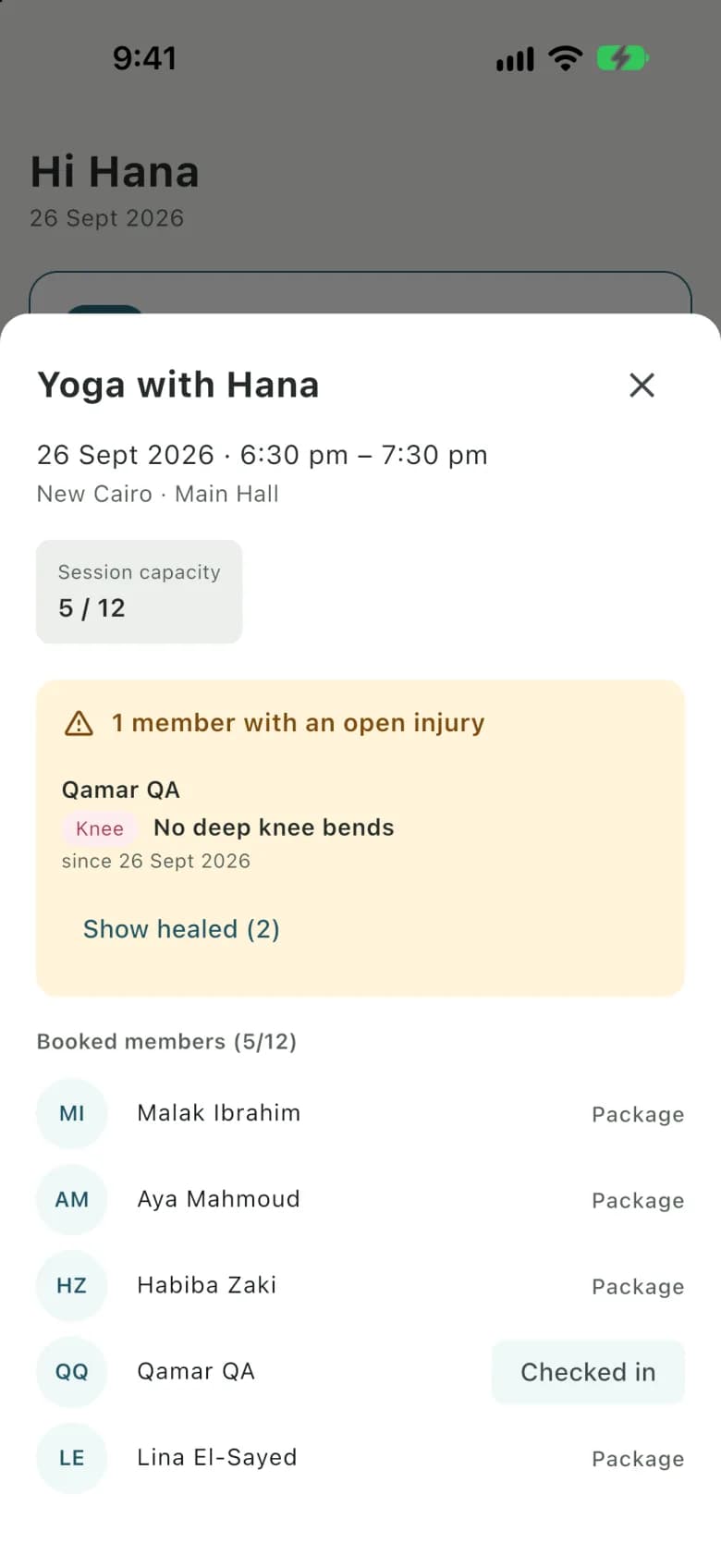
Opening a class shows its date, time, branch, room and capacity, then two things the instructor needs before they start:
- The injury briefing. Customers booked into the class who have an open injury, each with the body area and the one-line restriction ("No deep knee bends"). Healed injuries stay behind Show healed, as history. The briefing appears only when someone booked has an injury on record — see Injuries.
- Booked customers. Names and initials, with Checked in beside anyone who has checked in from their app. Nothing else about the customer is shown.
The alerts they get
Instructors are told, in the app and as a push notification on their phone:
| When | The message |
|---|---|
| You add them to your studio and they already have an Owelz instructor account | That your studio added them, and to open the app to see your classes. |
| You put them on a new class | New class with its name, time and branch. A recurring series sends one message, for its first upcoming class. A class you enter after it happened sends nothing. |
| You move a class they teach | The new time and place. |
| You cancel it | That it is cancelled. |
| Two hours before each class | A briefing: how many are booked and how many have an open injury. |
There is no message each time a customer books — the class page is always current.
My record
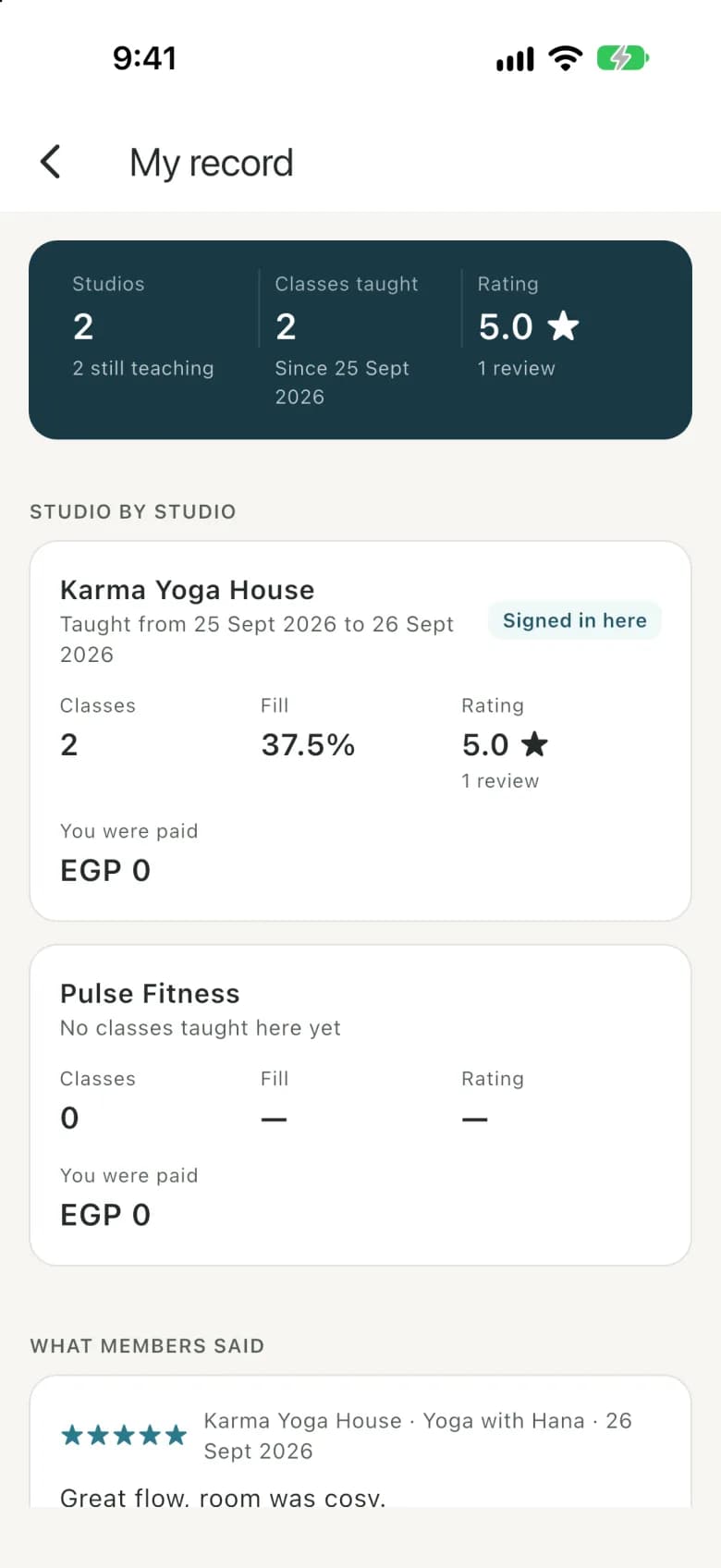
My record gathers the instructor's teaching across every studio on Owelz that has them on staff: classes taught, how full those classes were, the rating customers gave them, and what they were paid — per studio, in that studio's currency, with anything approved but not yet paid shown as pending. Beside it, How you're paid sets out each studio's deal in plain words — $20 per class + $5 per customer from the 3rd, say — and any upcoming change with the date it starts, so an instructor can check their pay without asking. Underneath are the reviews customers wrote about them.
Other studios never see your figures, and you never see theirs. The instructor sees their own pay from each, nothing more — not a studio's revenue, customers or prices. An instructor on a share of class revenue sees the percentage, not the revenue behind it.
What they cannot do
The instructor app is read-only for your business. Instructors cannot book or cancel for customers, check customers in, change a class, see customers' contact details or packages, or see anything about revenue, sales or other staff. Anything like that is done from the dashboard by someone with the right role.
أسئلة شائعة
- How does an instructor get into the app?
- With their own Owelz instructor account. When you add them with their email, Owelz emails them an invitation to choose their password; they then sign in with their email, username or phone at instructor.owelz.com or in the Owelz instructor app on iPhone or Android. You never set or see the password. If they forget it, Forgot your password? emails a reset link to the address on their account.
- Can instructors see customers' phone numbers or emails?
- No. A class's list shows customers' names and whether they are booked or checked in — never contact details, packages or payments.
- Can an instructor check customers in?
- No. Customers check themselves in from their own app in the hour before class, and the instructor sees it happen on the class list.
- An instructor teaches at two studios on Owelz. Do they get one login?
- Yes. Each instructor has one Owelz instructor account, whichever studios they teach for. When you add someone whose email already has an account, your studio is added to it and they are told; they then switch between their studios in the app, and My record gathers their classes, ratings and pay from all of them.
آخر تحديث 7 أكتوبر 2026