المحفظة والخزنة
Every movement of money in one filterable ledger — package sales, walk-ins, expenses, payroll and settlements — with a live cash box you can reconcile at close.
The Wallet is the single ledger. Every package sale, walk-in, voucher sale, expense, wage payment and settlement is a row, and the four tiles above it summarise the window you are looking at: cash box, money in, money out, net.
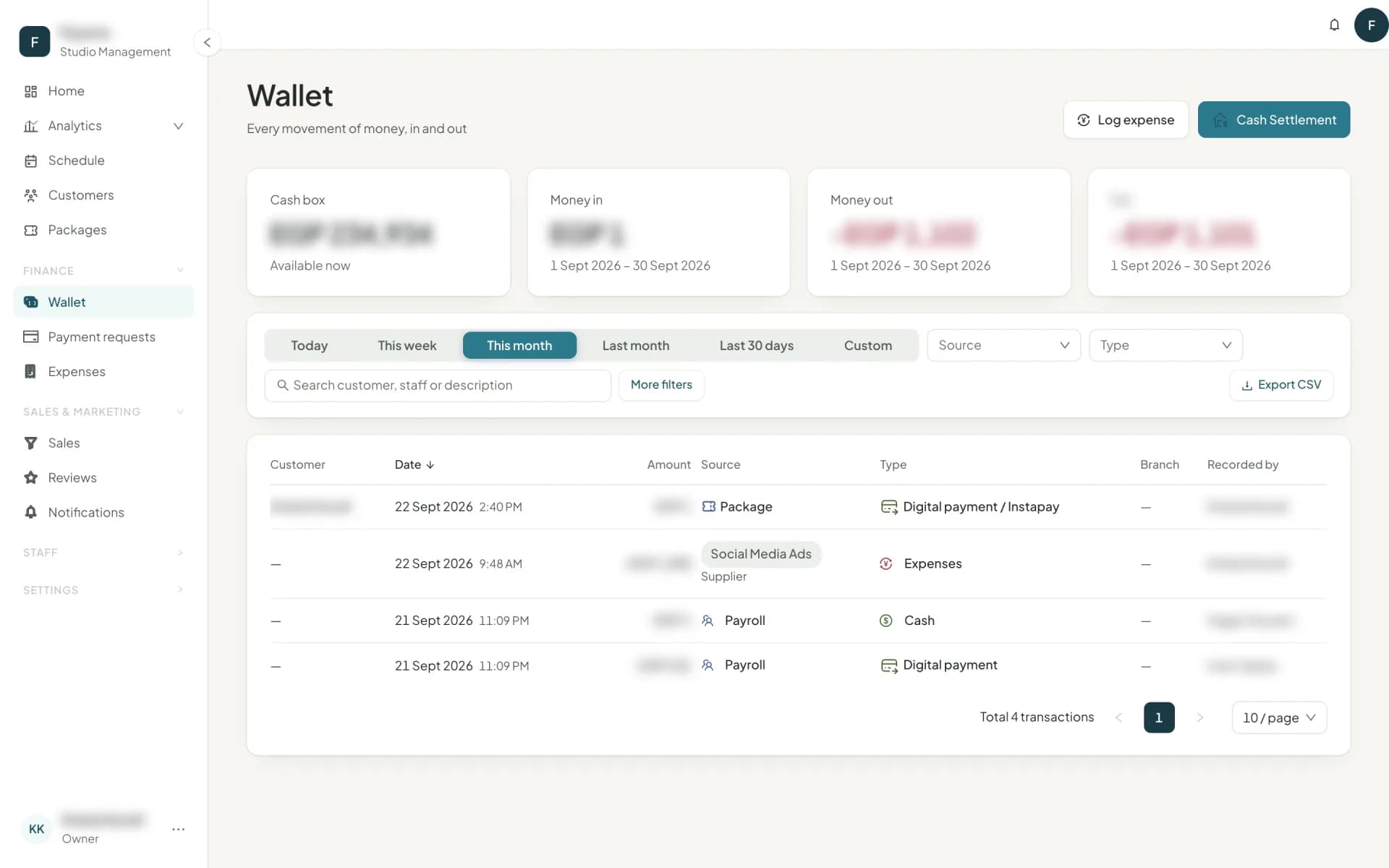
The cash box
The cash you should physically have in the drawer:
+ cash package sales, cash walk-ins and voucher codes sold for cash − cash walk-ins refunded when a booking is cancelled, cash sales removed, and sold voucher codes voided (voiding refunds the buyer) − expenses paid in cash (a voided one comes back) − wages paid in cash − settlements
Digital payments never touch it — they went to a bank, not a drawer.
If you imported your history, the cash in those old sales and expenses does not move the box — that money was counted long ago. The import's finish screen asks for Cash in the drawer now once, and the box starts from what you count. It shows in the ledger as a row noted Opening cash, which is never revenue.
Cash Settlement is how cash leaves: you take money to the bank or hand it to the owner, record the amount, and the cash box comes down. Do this at the same moment you physically move the money and the box stays honest. Owelz will not let you settle more than the box holds.
Filters
The wallet is built to answer questions, not just to list:
- Date — today, this week, this month, last month, last 30 days, or a custom range.
- Direction — money in, money out, all.
- Source — package, walk-in, voucher, cash settlement, custom, payroll.
- Type — cash or digital payment.
- Branch, Recorded by, Customer, and a free-text search over customer, staff and description.
"Everything Sara took in cash at Maadi last month" is four clicks. Export CSV takes the filtered set straight to your accountant.
Reading a row
Each row carries the customer, amount, source, type, date, who recorded it and the branch. A payroll row names the person paid, marked Payee, in the customer column, and leaves Recorded by empty. Corrections are rows of their own — a cancelled walk-in, a removed sale or a voided voucher code is a negative row, never an edit — so the ledger always adds up to the cash box. Rows from before branches existed show as unassigned, and the table says why. Rows brought in by importing your data sit on their real dates and carry a small Imported tag.
The wallet is studio-wide money, so roles limited to some branches do not see it.
What the wallet is not
It is a cash ledger, not an accounting system. It records money as it moves and makes no attempt at accruals, tax or statutory deductions. For earned rather than collected revenue — the value of classes actually attended — use Analytics → Revenue, which reports both and keeps them apart.
Next
Money customers send you from the app: payment requests →
أسئلة شائعة
- What exactly is the cash box?
- The cash you should physically have: cash sales in, cash expenses and cash wages out, minus what you have settled. Settling records cash leaving the studio for the bank or the owner.
- Can I export the wallet?
- Yes. Export CSV respects every filter you have applied, with a row limit that tells you to narrow the date range if the export would be too large.
آخر تحديث 7 أكتوبر 2026