
Import your data
Move your members, packages and remaining credits from your old system with a spreadsheet — in the right order, with every row checked before anything is written.
Import data takes the spreadsheets you already keep — an export from your old system, or the file your front desk has been maintaining — reads the columns, shows you what it found, and only then writes anything.
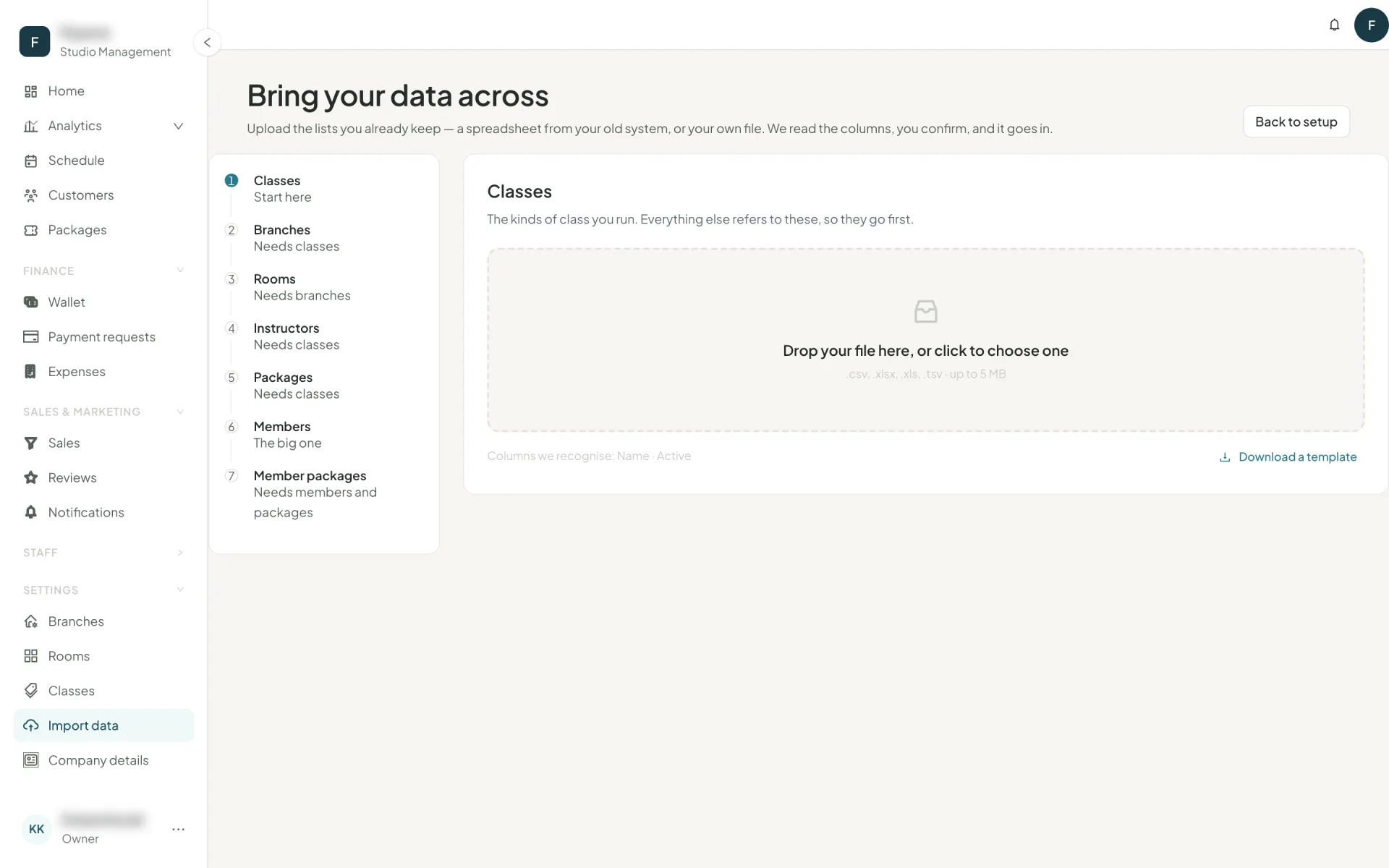
The order is not a suggestion
Each list refers to the ones before it by name. Import out of order and nothing matches.
Classes
The kinds of class you run. Everything else points at these.Branches
Your locations, and which classes each one offers.Rooms
The spaces inside each branch, and how many people fit.Instructors
Who teaches, what they teach, and their hourly rate.Packages
Your price list: what a member buys, what it covers, how long it lasts.Members
The long one — and usually the reason you are on this page.Member packages
What each member holds and what is left of it.
If you try to import instructors before classes exist, Owelz stops you and says which list to do first.
How one import goes
- Drop the file.
.xlsxor.csv, up to the stated size limit. Column names go in row 1. - Map the columns. Owelz matches what it recognises automatically and shows the first value from your file next to each field so you can see it guessed right. Anything you do not need, leave as Not imported.
- Read the preview. Every row is labelled: Ready, Needs attention, Repeated in file, or Already here — with the specific problem spelled out per row ("No class named 'Reformr' — import it first, or correct the spelling").
- Fix or skip. Download just the problem rows as a sheet, correct them, and import that file afterwards. Ready rows do not wait for the broken ones.
- Import. A progress line counts through, and you can stop it. What went in stays in.
Member packages: the one that matters
This is the list that makes the switch invisible to your members. Each row is one member holding one package, and it carries both the balance and the history:
| Field | Why it matters |
|---|---|
| Member email | How the row finds the member. |
| Package | Matched by name against the packages you imported. |
| Sessions remaining or Sessions used | Either one gives the balance. Give both and they must agree — Owelz does the arithmetic and tells you if they do not. |
| Start date / End date | The validity window. This is what makes a package active, expiring or expired today. |
| Price paid and Paid by | Not needed to run the studio — needed for your revenue reports to have a past. |
Dates
Dates are read day-first: 01/03/2026 is 1 March 2026. ISO (2026-03-01) and genuine spreadsheet date cells are read exactly. If a date resolves to an implausible year, the row is flagged rather than silently accepted — which is how a day/month mix-up gets caught before it expires someone's package.
Next
You are set up. Put classes on the calendar: sessions →