Home — the daily screen
Four headline numbers, three alert cards that turn them into a list of people to call, the Weekly Revenue Brief, six key metrics and the four playbooks.
Home is the screen to open with coffee. It answers two questions: how is the studio doing and what should someone do today. Everything deeper lives in the reports.
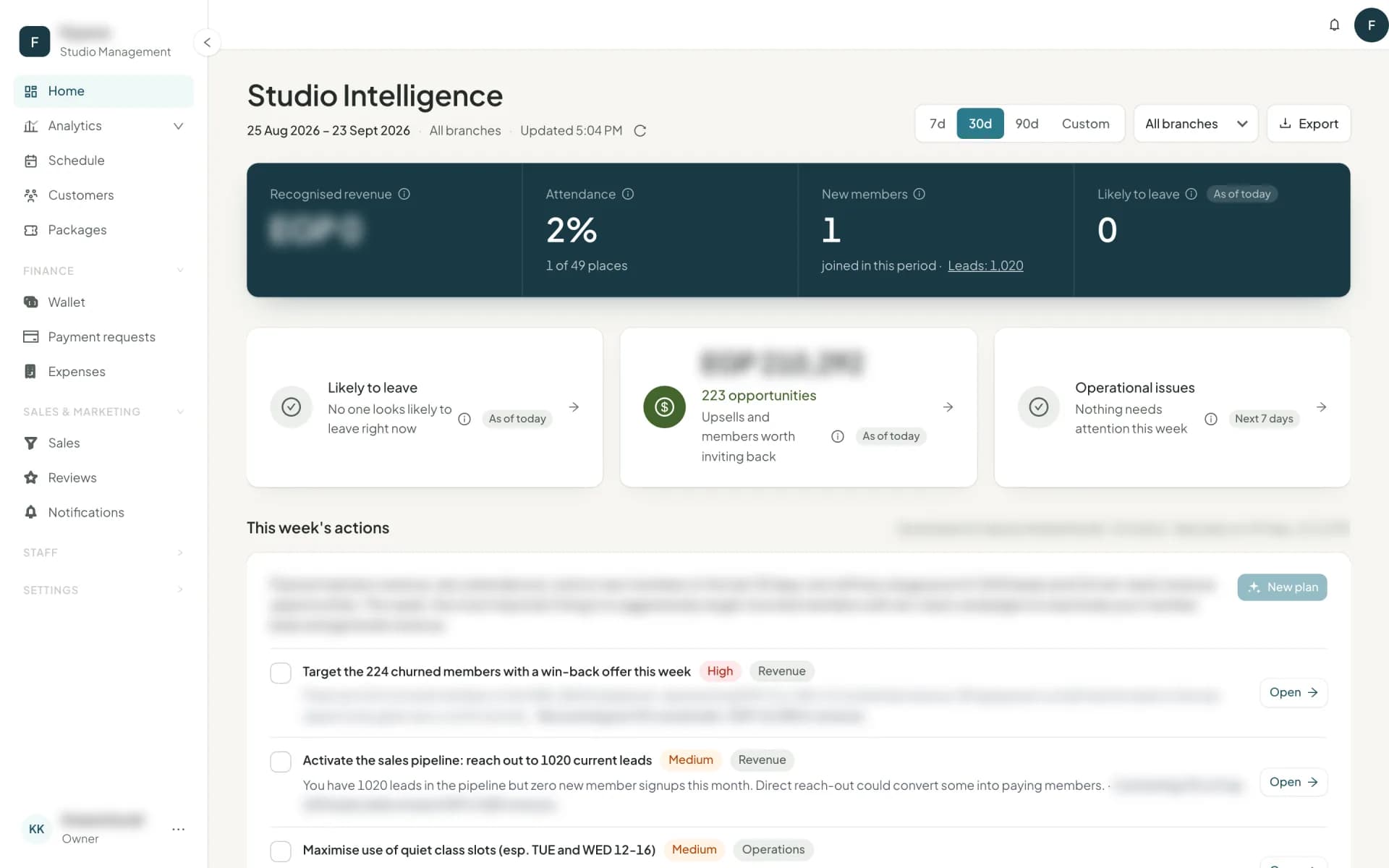
Choose the range — 7, 30 or 90 days, or custom — and, if you have several locations, a branch. Some figures are company-wide or "as of today" by nature; those say so rather than showing a wrong per-branch or per-range number. Export downloads what is on screen as a CSV.
The headline numbers
| Number | What it is |
|---|---|
| Money in | Every payment received in the range (package sales, walk-ins and vouchers, cash or digital) before any refund, with Money out underneath: refunds, instructor and staff pay, expenses and cash taken out of the cash box |
| Attendance | How full the classes were — % full, with attendances of places underneath |
| New customers | Customers who joined in the range, with a link to the leads count beside it |
| Likely to leave | Paying customers showing signs of leaving, as of today |
Money in and Money out are the Wallet's own two figures for the same dates and branch, so the two pages always agree. Sell a 1,000 package and a 150 walk-in, then refund the walk-in: Money in is 1,000 + 150 = 1,150 and Money out is 150. Everyone who can open Home sees them. With a branch picked they cover that branch only, and payments with no branch (rent, cash-box settlements, anything recorded before branches existed) are left out, as on the Wallet. Someone who manages only some branches sees those branches' money, never another's. The value of the classes attended — Earned from classes — is in the reports.
An attendance is a check-in, or a booking on a class that has already started and was not cancelled. % full counts only the classes that have already started — attendances ÷ their places — so a class later today never lowers it.
If nothing happened in the range you picked, Home says so and offers the last window that had activity. A brand-new studio sees what will appear once customers and sessions exist, with Import your customers and Set up the schedule to get there.
The three alert cards
This is the part that changes what happens today.
Likely to leave — paying customers showing signs of going: coming less than they used to, weeks since their last class, a package ending unused, or new and not yet started. Open the card for the list, each with the reason and a suggested action.
Revenue opportunities — customers who would be better off on a bigger package, and past customers worth inviting back, with an estimated monthly value attached.
Operational issues — things to fix this week: a class with no instructor, a class booked past capacity, a waiting list while a similar class sits half empty, classes running consistently under your fill threshold.
Every list gives you Call, WhatsApp, Email and Open profile per row, plus Copy list and Copy emails for a BCC. Tapping Call, WhatsApp or Email logs the outreach automatically, with a few seconds to undo — which is what lets the playbooks count who has been contacted rather than guess. Log action records anything else, for one customer or a selection.
The Weekly Revenue Brief
Below the alert cards, the Weekly revenue brief answers one question: what's within reach this week? It is a button, never automatic. Build my weekly brief reads your last 30 days and finds the money within reach this week. Once a week.
Owelz computes every list and every number from your own records: packages due to renew, payments waiting for your confirmation, new customers who have come fewer than twice, customers slipping away, packages that ended recently, leads who never bought, full classes with waiting lists. The AI only ranks them and writes the words. It receives totals, never a customer's name or contact details, and it cannot invent a figure.
You get 3 to 5 actions for the week, sized for one front desk. Each says why, gives a few steps, and shows how many customers it covers and the money involved, from your records. Its buttons do the work:
- Open the 14 customers opens Customers filtered to exactly that list. Each row's WhatsApp is ready with the message, and the customers who have already acted are marked.
- Copy the message copies the WhatsApp or SMS text to send them, in English or Arabic.
- Make an offer starts a promotion from one of your own packages when one fits.
Payments waiting for you open the payment requests, and full classes open the schedule. Each action then counts what came back since the brief was built (5 of 14 renewed), and the next brief starts with last week's scorecard. Tick an action off when it is done.
The full report. The same press writes a consultant's report: the verdict, six studio-health pillars, the big move for the next one to three months, what the data shows with the evidence behind it, what to stop doing, and costs and margins. It is shown only to people whose role has Consultant report. The owner has it, and you can give it to other roles. They see Read the full report; everyone else sees the actions, with The full report is with the studio owner.
One brief a week: the button unlocks seven days after the last one (Next brief on …). Building it needs Analytics set to Manage and a view of every branch. Everyone with Analytics View reads the actions, and ticking them off needs Manage. When fewer than two lists have anyone on them, the brief says Nothing needs chasing this week and no week is used.
The key metrics
| Metric | What it is |
|---|---|
| Average monthly money in | Money in over the last three full months ÷ 3, against the three months before |
| Churned customers | Customers with no paid package for 60 days or more — or no class in 6 months, whatever the package — with their share of the customers you've had this year |
| Lifetime value | Average lifetime spend per paying customer |
| Revenue per customer | Revenue in range ÷ the customers who paid |
| 12-month retention | Of the customers active 12 months ago, how many still hold a package |
| Studio health score | A weighted score out of 100 across retention, utilisation, revenue growth and customer risk |
Every one carries its own explanation on hover, with the actual arithmetic: "31 of the 48 active 12 months ago still hold a package." The health score shows its four parts, weakest first, and what would move it most. Churned customers links straight to the list in Customers. Nothing on this page is a number you have to take on trust.
Go deeper, and the playbooks
Open Analytics takes you to the twelve reports. Underneath it are the four playbooks — standing plays with a target list, an estimated monthly value and how many have been contacted. See customer risk and playbooks.
Next
The engine behind the alerts: customer risk and playbooks →
Common questions
- What is Average monthly money in?
- The money in over the last three full calendar months, divided by three, set against the three months before. It follows the Revenue report's rule, the dates picked at the top don't move it, and under a branch filter it says it covers the whole studio.
- Does Money in on Home match the Wallet?
- Yes, always. It is the Wallet's own Money in for the same dates and branch, and the line under it is the Wallet's Money out. Recognised revenue, the value of the classes attended, is in Analytics.
- Why does a metric say "Not enough data yet"?
- Several metrics need a minimum history or a minimum number of customers to be meaningful. Rather than print a number built on four people, Owelz says what it is waiting for.
- Where did the customer table, revenue forecast and cohorts go?
- To Analytics. Home keeps what needs a glance every day; the customer intelligence table is on Analytics → Customers, the forecast on Revenue, cohorts on Retention, class and slot performance on Schedule, and profit after instructor pay on Expenses & profit.
Last updated 2 November 2026