Customer profiles
One page per customer — packages, sessions, notes, documents, injuries, referrals and a full history of who changed what.
Customers lists every customer with their status, package, classes left, last session and when they joined.
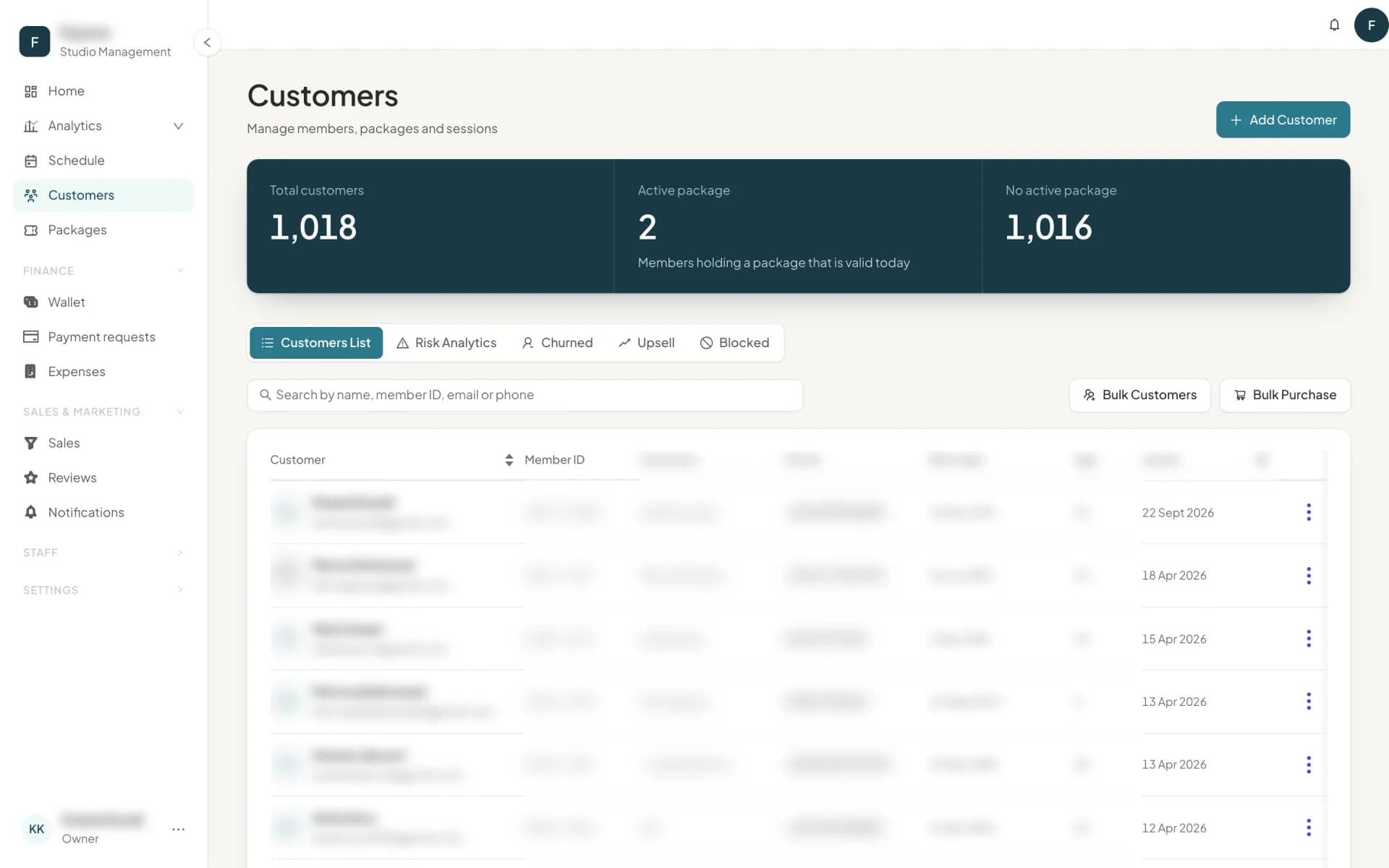
The tabs across the top are five different questions about the same list:
| Tab | The question it answers |
|---|---|
| Customer list | Everyone. Show narrows it to customers (bought at least one package) or leads (not yet); Customer of and Stage filter further. |
| Risk analytics | Who is about to stop coming — see customer risk. |
| Upsell | Who is attending more than their package assumes. |
| Churned | Who had a package and left — no package for 60 days, or no class in 6 months — sorted by what they used to be worth. |
| Blocked | Who cannot book, why, and who blocked them. |
The profile
Open anyone and you get their whole relationship with the studio.
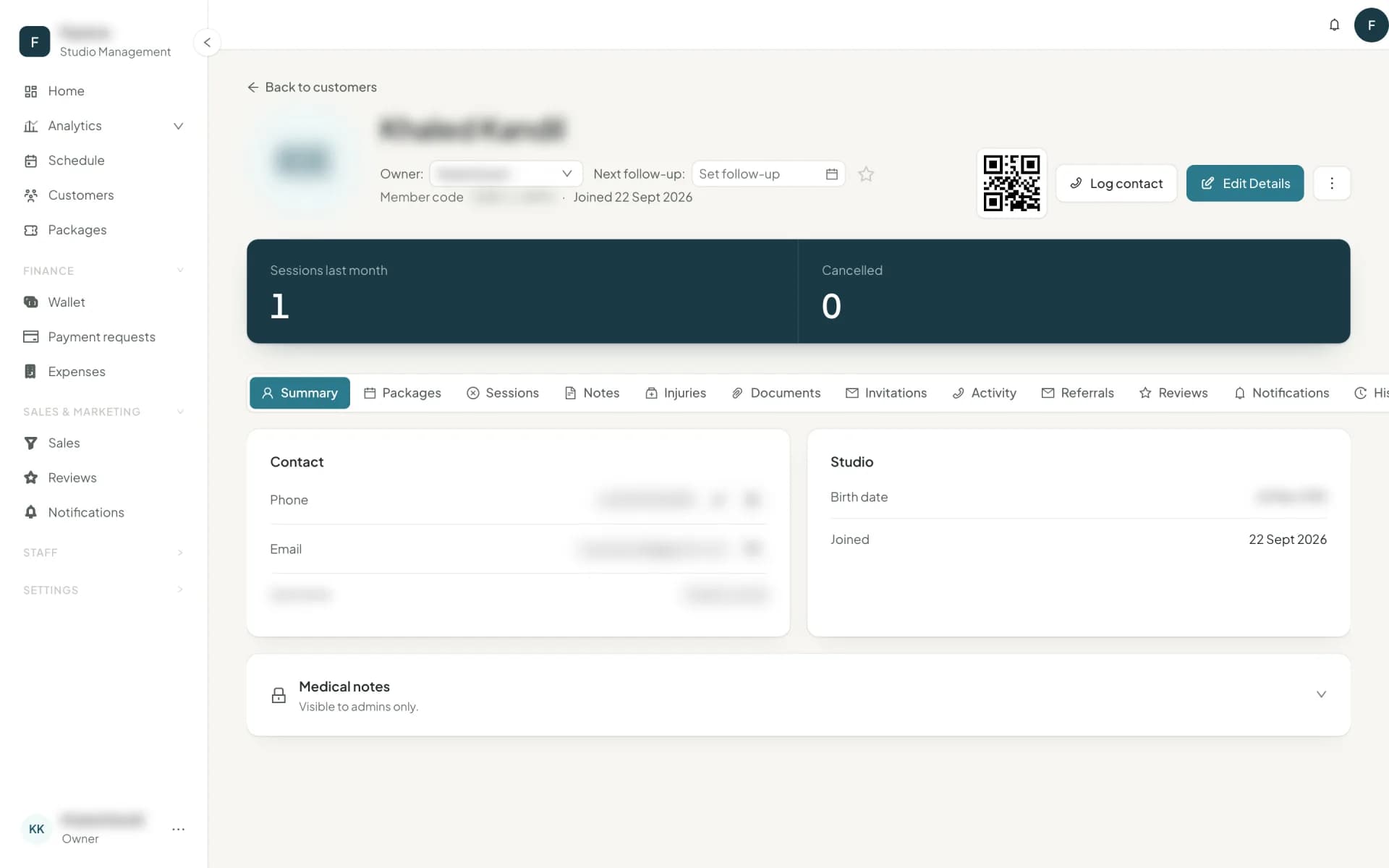
- Summary — phone, email, birth date, username, sessions attended last month, cancelled sessions.
- Packages — every package they have held: active, purchased but not activated, frozen, expired. Classes, freezes and invitations remaining, with start and end dates you can adjust.
- Sessions — bookings, check-ins and cancellations, each showing how it was paid: package, walk-in with the price, or invitation.
- Invitations — guest passes from their packages, with expiry dates, markable as used.
- Notes and Documents — see notes and documents.
- Injuries — what instructors need to know before class. See injuries.
- Offers — the vouchers they hold or used, and the promotion offers they were sent.
- Referrals — who invited them, and how many friends they have brought in who actually joined.
- Reviews — what they have said about the studio, its instructors and its classes.
- History — every change to the record: "Home branch changed from Maadi to Zamalek by Sara (Admin)".
- Activity — outreach: the calls, WhatsApps and emails your team logged, and what came of them.
Customers who use the app
A profile marked Uses the Owelz app belongs to someone who signs in to the customers app with their own Owelz account. They see this record's packages and bookings there and book on their own. Their email is their sign-in, so the desk cannot change it — they change it in the app, and a change to their name or phone in the app updates this record too. Your notes, stage, medical notes and history stay yours; the customer never sees them, and no other studio does either. See the customers app.
Customers can add their Instagram, Facebook and TikTok in the app, all optional. Staff with access to customers see them on the profile once the customer has booked or bought at your studio. Instructors and other customers can't.
Identity and the customer code
The header carries the customer code — shown as a QR under Show customer code and printable as a customer card. Scanned or typed into the Customers search, it finds the customer. To check someone in, the desk scans the check-in code the customer shows in the customer app (My check-in code), with Scan to check in in the Studio Owner app.
Contact gives you one-tap Call, WhatsApp and Email. Using them from a playbook list logs the contact automatically, so the playbook shows how many of its list you have reached.
Stages
Every customer carries a stage that Owelz maintains for you:
Lead → Active → Expired → Churned
It drives the sales pipeline, the groups you message from the Communication center, and the lifecycle charts in analytics. You never set it by hand — it follows what the customer actually does.
Next
Getting people onto the list: adding customers →
Common questions
- What is a customer's stage?
- Owelz maintains it automatically — Lead, Active, Expired, Churned — based on what they hold and when they last attended. It drives the sales pipeline and the retention reports.
- Can I see who changed a customer's details?
- Yes. The History tab records every change with the field, the old value, the new value, who made it and when.
Last updated 7 November 2026